<?xml version="1.0" encoding="utf-8"?>
<?xml-stylesheet href="http://travel-lab.info/tech/pblog/rss/style.css" type="text/css"?>
<rdf:RDF xmlns="http://purl.org/rss/1.0/"
         xmlns:rdf="http://www.w3.org/1999/02/22-rdf-syntax-ns#"
         xmlns:content="http://purl.org/rss/1.0/modules/content/"
         xmlns:dc="http://purl.org/dc/elements/1.1/"
         xml:lang="ja">
<channel rdf:about="http://travel-lab.info/tech/pblog/rss/1.0.php?id=58">
<title>Travellers Tales</title>
<link>http://travel-lab.info/tech/pblog/index.php</link>
<dc:date>2006-10-26T00:36:46+09:00</dc:date>
<description>
Travellers Tales - RSS (RDF Site Summary).
</description>
<items>
<rdf:Seq>
<rdf:li rdf:resource="http://travel-lab.info/tech/pblog/article.php?id=58" />
</rdf:Seq>
</items>
</channel>
<item>
<title>Firefox をブログエディタにする Performancing (ScribeFire) と P_BLOG</title>
<link>http://travel-lab.info/tech/pblog/article.php?id=58</link>
<dc:date>2006-10-26T00:36:46+09:00</dc:date>
<description>Firefox をブログエディタにする拡張機能
Firefox をブログエディタにする Performancing という拡張機能があるのを TechCrunch Japanese で知りました。Firefox 2.0 でもちゃんと動きます...</description>
<content:encoded>
<![CDATA[
<h4>Firefox をブログエディタにする拡張機能</h4>
<p>Firefox をブログエディタにする <a href="https://addons.mozilla.org/firefox/1730/">Performancing という拡張機能</a>があるのを <a href="http://jp.techcrunch.com/archives/the-new-mozilla-recommended-add-ons-list-the-winners-and-the-losers/" title="TechCrunch Japanese アーカイブ ? Mozilla最新おすすめアドオンリスト: 勝者たちと敗者たち">TechCrunch Japanese</a> で知りました。<a href="http://pagead2.googlesyndication.com/pagead/iclk?sa=l&amp;num=0&amp;client=ca-ref-pub-7689815939359680&amp;adurl=http://services.google.com/toolbar/firefox%3Fhl%3Dja%26ai%3DB6EpNeHU_RcHaFYLuYNbh3UTRnvIX99v7zwHFjbcBABABIMDLywVA2BJIojlQ3oWbmgKgAbWVyP0DsgEPdHJhdmVsLWxhYi5pbmZvyAEC2gEzaHR0cDovL3RyYXZlbC1sYWIuaW5mby90ZWNoL3BibG9nL2FydGljbGUucGhwP2lkPTE5gAIBlQJDNxgK&amp;ai=BmShheHU_RcHaFYLuYNbh3UTRnvIX99v7zwHFjbcBABABIMDLywVA2BJIojlQsMeThwSgAbWVyP0DsgEPdHJhdmVsLWxhYi5pbmZvyAEC2gEzaHR0cDovL3RyYXZlbC1sYWIuaW5mby90ZWNoL3BibG9nL2FydGljbGUucGhwP2lkPTE5gAIBlQJDNxgK">Firefox 2.0</a> でもちゃんと動きます。</p>
<ul class="ref">
<li><a class="ex-ref" href="https://addons.mozilla.org/firefox/1730/">Performancing という拡張機能</a></li>
</ul>
<p>これを <a href="http://travel-lab.info/tech/pblog/files/article.php?id=3">XML-RPC モジュール for P_BLOG</a> で試してみましたが、ちゃんと動くようです。以下設定方法など。</p>
<script type="text/javascript"><!--
google_ad_client = "pub-7689815939359680";
google_ad_width = 468;
google_ad_height = 60;
google_ad_format = "468x60_as_rimg";
google_cpa_choice = "CAAQ99v7zwEaCIe_0i_IC8kRKMG793M";
google_ad_channel = "";
//--></script>
<script type="text/javascript" src="http://pagead2.googlesyndication.com/pagead/show_ads.js">
</script>
<!-- more -->
<h4>P_BLOG の Performancing 設定</h4>
<ol>
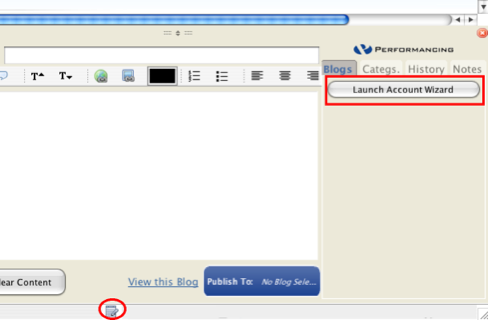
<li><p>ステータスバー（ウインドウ一番下の）Performancing のアイコンをクリック</p></li>
<li>
<p>"Launch Account Wizard" をクリック</p>
<p>
<img src="http://travel-lab.info/tech/pblog/resources/Performancing1.png" height="320" width="488" alt="Performancing1" />
</p>
</li>
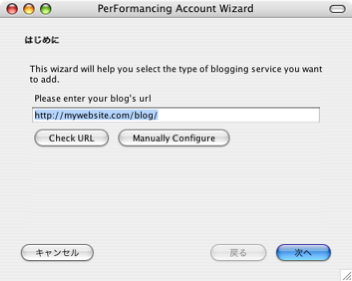
<li><p>"Manually Configure" をクリック</p>
<p>
<img src="http://travel-lab.info/tech/pblog/resources/Performancing2.png" height="281" width="352" alt="Performancing2" />
</p>
</li>
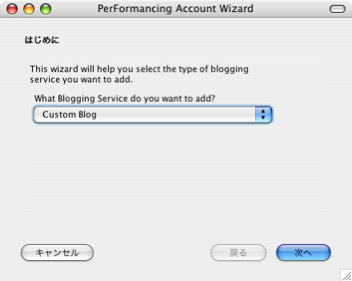
<li><p>"Custom Blog" を選択し、"次へ"をクリック</p>
<p>
<img src="http://travel-lab.info/tech/pblog/resources/Performancing3.png" height="281" width="352" alt="Performancing3" />
</p>
</li>
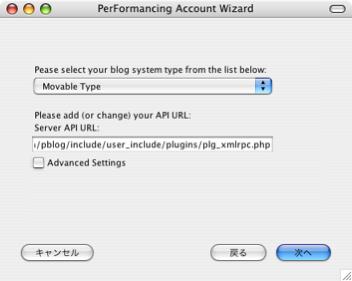
<li><p>blog system type として "Movable Type" を選択し、Server API URL には plg_xmlrpc.php の URI を</p>
<p>
<img src="http://travel-lab.info/tech/pblog/resources/Performancing4.png" height="281" width="352" alt="Performancing4" />
</p>
</li>
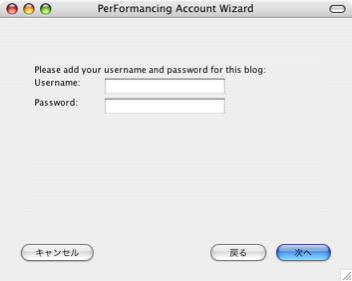
<li><p>Username と Password に P_BLOG の管理者アカウントのものを</p>
<p>
<img src="http://travel-lab.info/tech/pblog/resources/Performancing5.png" height="281" width="352" alt="Performancing5" />
</p>
</li>
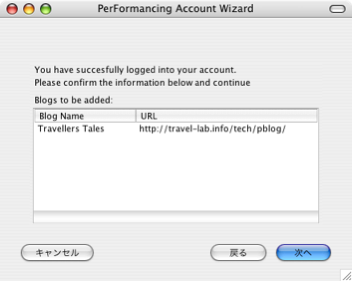
<li><p>ブログ名、URI が正しく表示されていたら "次へ" をクリックし、設定終了</p>
<p>
<img src="http://travel-lab.info/tech/pblog/resources/Performancing6.png" height="281" width="352" alt="Performancing6" />
</p>
</li>
</ol>
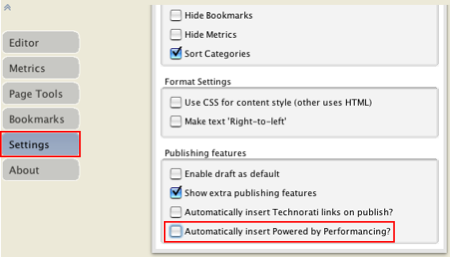
<p>以上でセットアップは終了ですが、あと1つ、"Setting" で "Automatically insert Powerd by Perfomancing?" のチェックを外しておかないと "Powerd by Perfomancing" という文字が投稿する記事の最後に追加されてしまいます。</p>
<p><img src="http://travel-lab.info/tech/pblog/resources/Perfomancing7.png" height="257" width="450" alt="Perfomancing7" /></p>
<h4>その他のブログでの Performancing 設定</h4>
<p>XML-RPC 等のアクセスポイントがわかっていれば、難しくないと思います。以下に検索で見つかったものをいくつかご紹介。</p>
<ul>
<li>ココログ：<a class="ex-ref" href="http://tiger.air-nifty.com/tigers_logs/2006/03/performancing_f_8cf6.html">(遊): Performancing for Firefox をココログで使う方法</a></li>
<li>Seesaa：<a class="ex-ref" href="http://ablog.seesaa.net/article/11132533.html">エブログ: Performancing for Firefox を Seesaa で使う方法</a></li>
<li>FC2：<a class="ex-ref" href="http://nbht.blog7.fc2.com/blog-entry-333.html">天空城日記 Performancing for firefoxのテスト</a></li>
<li>FC2：<a class="ex-ref" href="http://applehaguki.blog55.fc2.com/blog-entry-3.html">初めてのWEBデザイン Performancing for Firefox【Firefox拡張機能２】</a></li>
<li>ブログ人：<a class="ex-ref" href="http://kwmr.typepad.com/kanji/2005/12/firefox.html">いい感じ: Firefoxからブログ投稿！</a></li>
</ul>
<p>自分の使っているブログサービスに使えるかどうかは、Windows 用のブログエディタ <a href="http://www.witha.jp/BlogWrite/" title="BlogWrite - Atom API, XML-RPC に対応した Blog(ブログ)投稿クライアント">BlogWrite</a> で挙げられている<a href="http://www.witha.jp/BlogWrite/bloglist.html" title="BlogWrite - Atom API, XML-RPC　に対応した　ブログエディタ　Blog エディター Blog(ブログ)投稿クライアント　by Witha System Ltd">ブログ対応状況一覧</a>が参考になります。</p>
<ul class="ref">
<li><a class="ex-ref" href="http://www.witha.jp/BlogWrite/bloglist.html" title="BlogWrite - Atom API, XML-RPC　に対応した　ブログエディタ　Blog エディター Blog(ブログ)投稿クライアント　by Witha System Ltd">BlogWrite - ブログ対応状況一覧</a></li>
</ul>
<h4>名称が Performancing から ScribeFire に変更</h4>
<p>2007年3月7日にバージョンが 1.4 に上がったのを機に、名前が Performancing から ScribeFire になりました。ScribeFire のほうがいいネーミングだと思います。ネーミングの善し悪しでダウンロード数が変わることはありそうです。</p>
<div class="exref">
<ul>
<li><a href="https://addons.mozilla.org/ja/firefox/addon/1730">ScribeFire (previously Performancing for Firefox) :: Firefox Add-ons</a></li>
</ul>
</div>

]]>
</content:encoded>
</item>

</rdf:RDF>