<?xml version="1.0" encoding="utf-8"?>
<?xml-stylesheet href="http://travel-lab.info/tech/pblog/rss/style.css" type="text/css"?>
<rdf:RDF xmlns="http://purl.org/rss/1.0/"
         xmlns:rdf="http://www.w3.org/1999/02/22-rdf-syntax-ns#"
         xmlns:content="http://purl.org/rss/1.0/modules/content/"
         xmlns:dc="http://purl.org/dc/elements/1.1/"
         xml:lang="ja">
<channel rdf:about="http://travel-lab.info/tech/pblog/rss/1.0.php?id=52">
<title>Travellers Tales</title>
<link>http://travel-lab.info/tech/pblog/index.php</link>
<dc:date>2006-11-30T02:21:47+09:00</dc:date>
<description>
Travellers Tales - RSS (RDF Site Summary).
</description>
<items>
<rdf:Seq>
<rdf:li rdf:resource="http://travel-lab.info/tech/pblog/article.php?id=52" />
</rdf:Seq>
</items>
</channel>
<item>
<title>Universal 時代の Cocoa なバイナリエディタ 0xED</title>
<link>http://travel-lab.info/tech/pblog/article.php?id=52</link>
<dc:date>2006-11-30T02:21:47+09:00</dc:date>
<description>Carbon 時代のバイナリエディタ
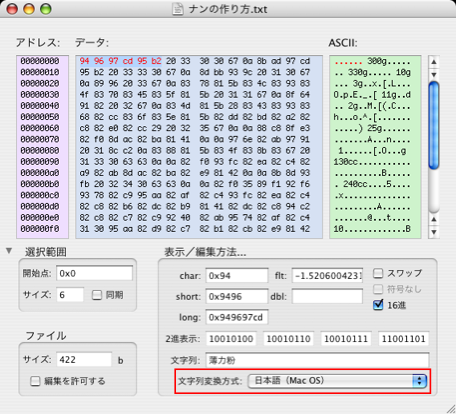
Mac OS X の16進ファイルエディタとしては、HexEditor を気に入って使っています。何がいいのかというと、文字のエンコーディングを指定して、表示させることができるところです。
同種のソフ...</description>
<content:encoded>
<![CDATA[
<h4>Carbon 時代のバイナリエディタ</h4>
<p>Mac OS X の16進ファイルエディタとしては、<a href="http://park.zero.ad.jp/pautha/hexeditor.html" title="HexEditor's_page">HexEditor</a> を気に入って使っています。何がいいのかというと、文字のエンコーディングを指定して、表示させることができるところです。</p>
<p><img src="http://travel-lab.info/tech/pblog/resources/HexEditor.png" width="456" height="414" alt="HexEditor" /></p>
<p>同種のソフトに <a href="http://www.geocities.co.jp/SiliconValley/5025/" title="HexEdit 日本語版のページ">HexEdit</a> があるのですが、こちらは文字コードを表示させることはできないのです。ただ、大きなファイルの場合、HexEditor ではうまく開けないことがあって、その場合でも HexEdit では開けました。一長一短でしょうか。名前が似ているので紛らわしいですね。</p>
<ul class="ref">
<li><a class="ex-ref" href="http://park.zero.ad.jp/pautha/hexeditor.html" title="HexEditor's_page">HexEditor 日本語ページ</a>（<a class="ex-ref" href="http://www.ex-cinder.com/hexeditor/hexeditor.html" title="Hex Editor">HexEditor オリジナル英語ページ</a>）</li>
<li><a class="ex-ref" href="http://www.geocities.co.jp/SiliconValley/5025/" title="HexEdit 日本語版のページ">HexEdit</a>（<a class="ex-ref" href="http://hexedit.sourceforge.net/" title="HexEdit ? Macintosh 用 16進エディタ">HexEdit@SourceForge</a>）</li>
</ul>
<h4>Cocoa 時代のバイナリエディタ</h4>
<p>Intel CPU を搭載した Mac の登場に伴い、ソフトウェアの多くは PowerPC、Intel 双方でネイティブに動くように Universal Binary 化されていっているのですが、上記の HexEditor、HexEdit は、PPC バイナリのままのようです。昔からあるソフトなので、Universal 化が難しいのかもしれません。</p>
<p>このままでも Rosetta を通して Intel Mac 上で使うことはできます。しかし、やはり Intel ネイティブで動く16進エディタが欲しくなります。Universal バイナリのものは、知っている範囲では以下のようなものがあります。</p>
<ul class="ref">
<li><a class="ex-ref" href="http://www.suavetech.com/0xed/0xed.html" title="0xED is a native OS X hex editor based on the Cocoa framework">0xED</a></li>
<li><a class="ex-ref" href="http://ravenware.com/sware/PeekIt%20Users%20Guide.html" title="PeekIt Users Guide">PeekIt</a></li>
<li><a class="ex-ref" href="http://ridiculousfish.com/hexfiend/" title="Hex Fiend - A fast and clever open source hex editor for Mac OS X">Hex Fiend</a></li>
</ul>
<p>この中でエンコーディングを指定して、文字コードを表示させることできるものはありませんでした。<a href="http://ravenware.com/sware/PeekIt%20Users%20Guide.html">PeekIt</a> は外部プラグインとして、Data Formatter を提供できるので、プラグインを開発すればできるのかもしれませんが、そこまでは手が出ないなぁと思っていたところ、<a href="http://www.suavetech.com/0xed/0xed.html">0xED</a> がアップデートされ、変更点に <q title="0xED - Version History" cite="http://www.suavetech.com/0xed/history.html">Text encoding for pasteboard copying/pasting is user selectable.</q> とあります。</p>
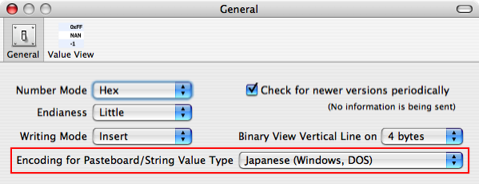
<p>試してみると、0xED の環境設定で文字エンコーディングを指定してやると、日本語も表示できるようになっていました。</p>
<p><img src="http://travel-lab.info/tech/pblog/resources/0xED_Pref.png" width="479" height="184" alt="0xED 環境設定" /></p>
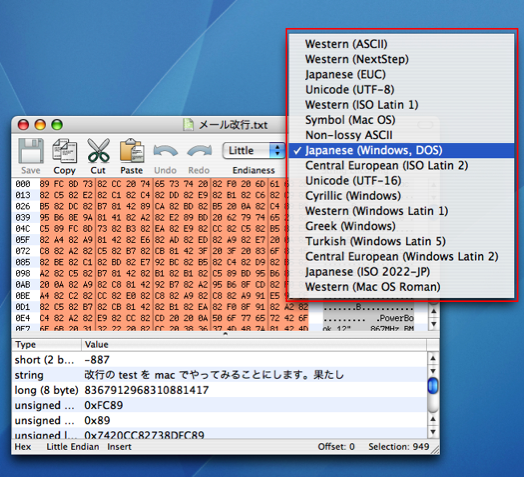
<p>Universal アプリケーションでこれができるようなバイナリエディタが出てきたのは嬉しかったので、作者さんに要望を送って、ついでにツールバーでもエンコーディングを選択できるように頼んだところ、早速実装してくれました。</p>
<p><img src="http://travel-lab.info/tech/pblog/resources/0xED_ToolBar.png" width="524" height="477" alt="0xED ツールバー" /></p>
<p>エンコーディングのリストをユーザがカスタマイズできるようにも要望してみたところ、次のバージョンで対応してくれるとのことです。ここしばらくアップデートがないので、忘れられてしまっていないといいのですが。もしよかったら、他の方もこれに限らずリクエストを送ってみて下さい。ソフトウェア制作者の方はフィードバックがあると嬉しいものだと思いますよ。</p>
<ul class="ref">
<li><a class="ex-ref" href="http://www.suavetech.com/0xed/feedback.html">0xED - Feedback/Report Bug</a></li>
</ul>

]]>
</content:encoded>
</item>

</rdf:RDF>